The photo looks like a detail — but it's one of the most common reasons a residence application runs into trouble. If your file doesn't meet the requirements, the system simply won't let you submit the application; and if the mistake slips through, the wojewoda (regional governor) will summon you to provide a correct photo — and if you don't respond, the application will be left without consideration (pozostawiony bez rozpoznania). That means lost time — and sometimes lost money. The good news: the rules are clear, and you can get it right the first time. This article pulls them into one simple list — for the CUKR residence card, the temporary residence permit (including pobyt czasowy i praca, residence and work), permanent residence, and EU long-term-resident status.
The MOS system can reject a non-compliant photo automatically — and then you can't submit the application at all. That's why it's worth checking the file before you even start filling in the form.
Why the photo matters
The photo is part of the application, treated just as seriously as your passport or a payment confirmation. It can't be "any old" photo: not someone else's, not one from a year ago, not blurry. The system checks the file automatically and catches some errors right away. The rest surface later — and every such formal defect drags out the procedure. Better to spend a moment up front than to explain yourself to the office weeks later.
The 10 requirements — a checklist
Under the regulations, the photo must meet all of these conditions together:
- Color, undamaged, in good focus.
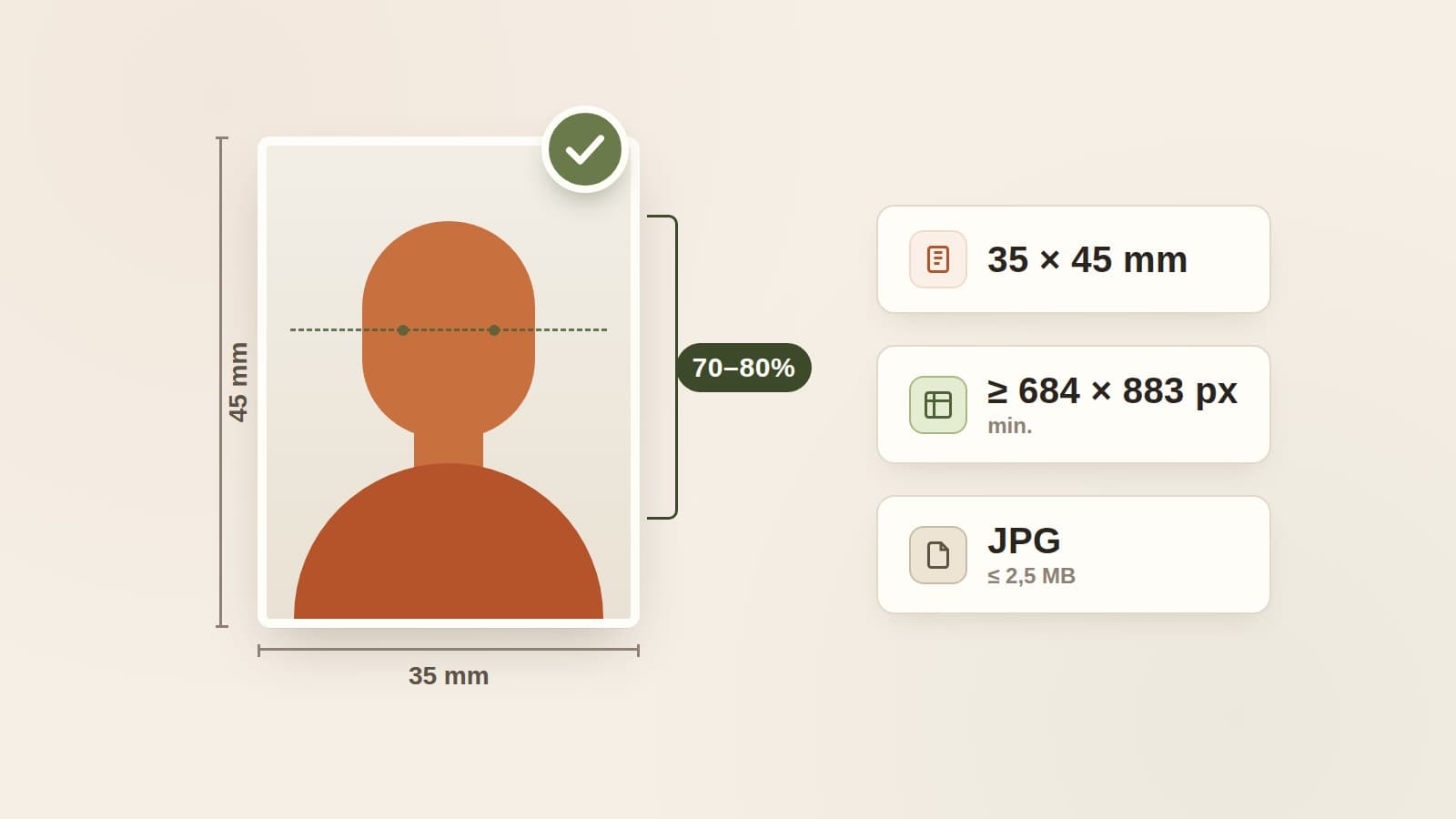
- Proportions of a 35 × 45 mm photo (width × height).
- Taken no earlier than 6 months before the day you file.
- Face from the crown of the head to the top of the shoulders fills 70–80% of the frame.
- A plain, light background.
- Frontal position, looking straight ahead, eyes open.
- Hair not covering the face, a natural expression, mouth closed.
- Natural skin color (no filters, no heavy retouching).
- Eyes clearly visible, especially the pupils; the eye line parallel to the top edge of the photo.
- No head covering and no dark-lens glasses.
Not sure your photo meets these conditions?
Describe it to the Dopomo virtual assistant — it'll tell you what to check before you upload the file with your application.
Ask the assistant →Digital-file parameters
For an application filed electronically in MOS (Moduł Obsługi Spraw — the government's system for residence matters) you attach a digital photo in JPG format. The file must be at least 684 × 883 pixels (width × height) and no larger than 2.5 MB, so that it keeps the proportions of a 35 × 45 mm photo. The easiest route is to ask a photographer for a "biometric ID photo in digital form" — good studios know these parameters and will hand you a file ready to upload. And if you run your case with the Dopomo CUKR assistant, it gets even simpler: the built-in biometric-photo tool analyses your file and — once it meets the requirements — prepares a version ready to upload. Want to take it yourself at home? Our step-by-step guide to taking a CUKR application photo shows you how to set up the framing, background, and lighting to meet these requirements on the first try.
Exceptions: glasses and head coverings
The rule of "no glasses, no head covering" has two exceptions in the law:
- Dark-lens glasses are allowed if you have a vision impairment. In that case you attach documents confirming the disability — or, if you can't produce them, your own declaration of disability.
- A head covering worn in line with your religion is allowed, as long as your face stays fully visible. You then attach a declaration that you belong to a religious community whose rules require covering the head.
1 photo online or 4 on paper?
It depends on which procedure you're filing:
- Non-EU procedures filed electronically in MOS — temporary residence (including pobyt czasowy i praca), permanent residence, EU long-term resident, and the CUKR residence card — require one digital photo (JPG) uploaded with the application.
- Paper procedures for EU citizens and their family members require 4 current biometric photos physically attached to the application.
Before you gather your documents, check which track you're on — the number and form of the photos differ.
The photo and fingerprints are two separate steps
A common mix-up: "if I've added the photo, the biometrics are done." Not quite. The photo is the file you attach to the application online. Fingerprints (along with your signature sample and showing your passport) are a separate step that happens later, in person at the regional office — after the application is filed. They're two distinct things, and it's worth keeping both in mind when you plan your visits.
Check the photo before you file
The detailed technical criteria for the photo are set out in a regulation (§ 3 of the MSW regulation of 29 April 2014, Dz.U. 2022 item 436; art. 15 of the Act on Foreigners), and MOS's detailed requirements guide is available in Polish only. If you're not sure your file meets every condition — from face proportions to the background and file size — don't guess. Describe the photo to the Dopomo virtual assistant, or ask about a specific point: file size, glasses, head covering, how recent the photo must be. It answers based on official sources — before you upload anything with your application.
Check your photo before you upload it
Ask the Dopomo virtual assistant about the photo requirements for your procedure — you'll get an answer grounded in official sources.
Ask the assistant →Ready to check whether you qualify for CUKR?
A few short questions about your situation. Free — takes under 2 minutes.
Save your progress & stay ahead
- CUKR eligibility result & action plan as a PDF
- Chat with the assistant — answers from official sources
- Conversation history saved to your account
- Official application fees